For those who missed our discussion on twitter you can see our Storify at sfy.co/hQTg . Thanks to everyone who contributed!
Below is an overview of what we covered in the session.
Communicating in 140 characters or less
When faced with only 140 characters it can be difficult to get your point across to your followers. There are however some key tricks:
- Release your inner journalist
The first sentence of a newspaper article provides an overview of the primary point of the article so release your inner journalist, get rid of all the unnecessary words and get tweeting!
- Your characters are precious so shorten your links!
If your sharing a link be sure to use a link generator to get your links to keep as many of your characters as possible. TinyUrl (http://tinyurl.com/) and Bitly (https://bitly.com/) are two popular link shorteners.
- Use hashtags..but not too much
Hashtags can be a quick an effective way to convey emotion or tone quickly and character-efficiently to your followers.
Favourite, Retweet or Quote?
What are they and when do you do it?
- Favourite – Similar to a ‘like’ on Facebook, you Favourite someones tweet when you want to show approval but don’t necessarily want to share the tweet with your followers
- Retweet – Share the entirety of someone’s tweet with your followers.
- Quote – Sharing someone’s tweet with your followers and comment upon it. The tweet will appear in quotation marks ” “. You can include your comment at the beginning or the end of the quoted tweet.
If you run out of characters when you are quoting the tweet it is okay to shorten the tweet. However when you do, be sure to put MT in the tweet to show that it is a modified tweet.
#Hashtags – The serious and the sarcastic
Hashtags are used for a number of reasons:
- To join the discussion
They can be used to group tweets together for an event (#getyourtweetsout) or to contribute to discussion on a particular topic, for example #auspol if you wanted to contribute to the discussion about Australian politics on twitter.
When you have a hashtag in your tweet your followers can select the hashtag an see all the other discussion that has occurred with that hashtag.
- Convey emotion
#happy365 #mondays #confused #grr #nerdy
Hashtags are a quick and easy way to convey emotion in your followers.
Managing the feed monster with lists OR separating your ‘lives’ with lists
Twitter is used for multiple purposes… well, pretty much everything. As a consequence it is often difficult to sort through all the different people and organisations you follow to make sure that you don’t miss anything. Lists can help you do this! Sorting the people you follow into lists you can get a quick overview of your library/professional feed, your book/reading feed, your news feed and whatever other list you want to create. Creating a list is easy. The toughest question you need to ask yourself if whether you want your list to be public or private.
Follow the below steps to create a list. Please note that these instructions are for making a list when you access twitter from your internet browser, if you use an app (tweetdeck, hootsuite etc) the process may be different:
Step 1: Go to your profile and select the lists tab
Step 2: Select create profile
Step 3: Customise your list. When selecting whether your list is public or private the key difference between the two is that with a public list the people you put in there will be notified that they have been added to your list and other people are able to view and subscribe to your list.
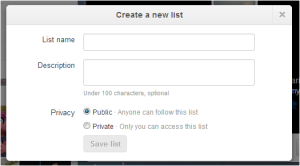
Step 4: Add people to your list by going to their profile and selecting the drop down menu and add to list
Step 5: Enjoy an organised twitter feed!
Direct communication
On twitter, you don’t always have to broadcast what you want to say to the whole twittersphere, you can contact a single individual.
You can do this by selecting from the interaction options on the persons profile, see above image. If you do want to share what you say to one person with your followers simply put a full stop at the start of the tweet. This will prevent Twitter recognising your tweet as a direct message and the tweet will appear in the feeds of everyone who follows you. Alternatively, if you put a person's twitter handle anywhere in a tweet they will receive a notification.
Taking photos
A picture can say 1000 words. Twitter allows you to share pictures with the twittersphere. Simply select the camera icon when you compose a tweet and it will be shared with your followers as an image.
That’s the end of our Twitter 101. If you do have any questions, put them in the comments and we will help
Also now that your a twitter expert don’t forget to register to be a guest tweeter at the ALLA 13! Contact Karen Rowe-Nurse on nsw.president@alla.asn.au to register to tweet at a session
Happy Tweeting!
Alex Cato (@curious_meow)
NSW News, Web and Social Media Co-ordinator
Posted: 2 September 2013


 Step 4: Add people to your list by going to their profile and selecting the drop down menu and add to list
 In preparation for the Twitter workshop on 28 August 2013 (tomorrow :P) be sure to follow the hashtag #getyourtweetsout !
 (Source: Aprewave Media; http://www.bizreport.com/2012/07/how-to-tweet—better.html)